순서도 모듈로 불량 검출 실습
레시피 개요
- 1.4 Recipe를 직접 순서도로 작성해봅니다
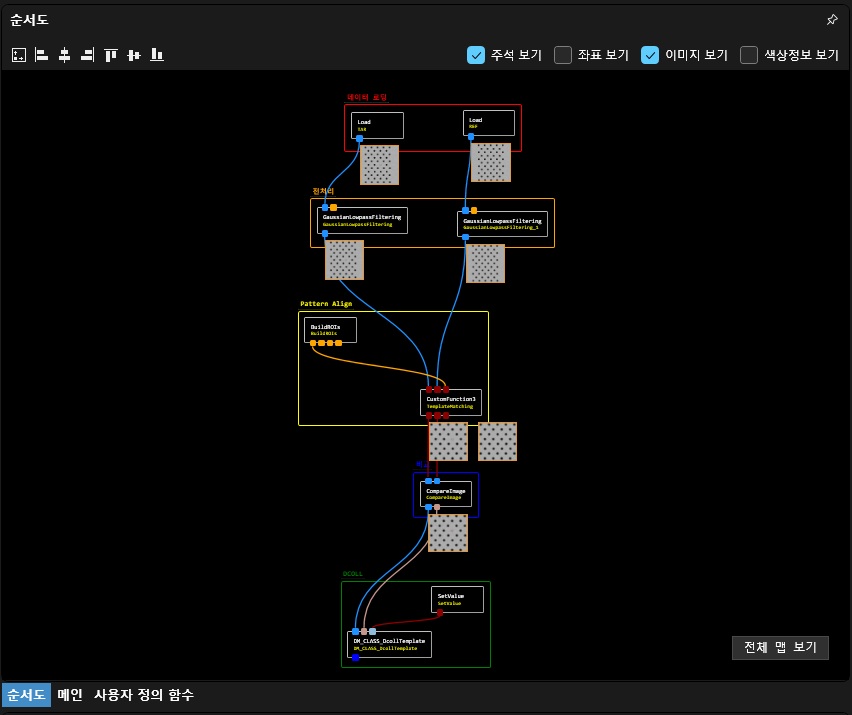
- 레퍼런스이미지와 Alignment 이후에 비교하여 밝기 차이가 발생하는곳 불량으로 검출하는 레시피를 작성해봅니다
모듈 구성
- Load 모듈을 2개를 불러와서 배치합니다
- 모듈은 이름 변경으로 이름을 지정할 수 있습니다. 예를 들어, Target, Reference 등으로 이름을 지정해놓으면 파라미터설정이 명확해집니다
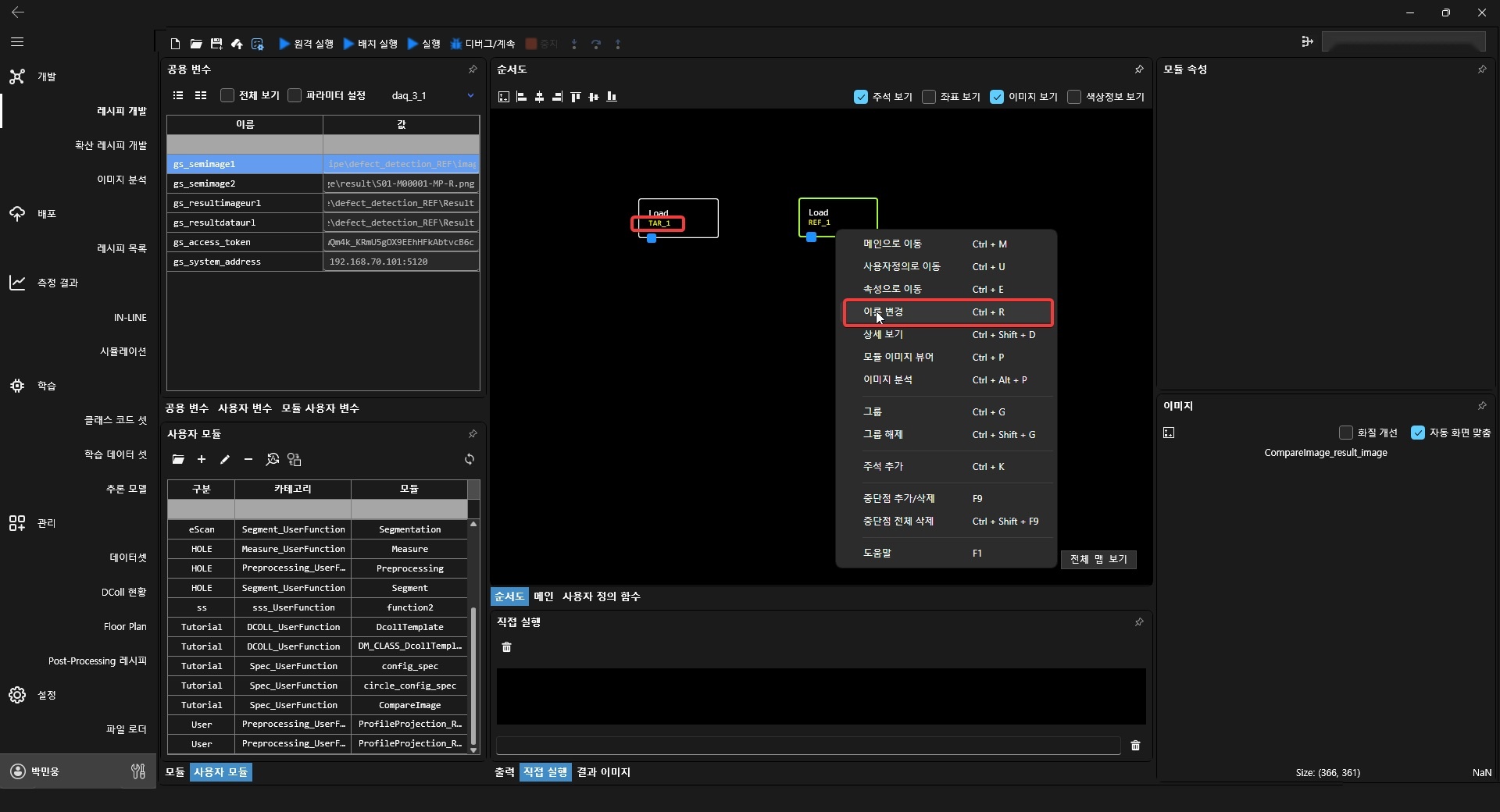
- 공용변수에서 이미지 2개를 설정합니다

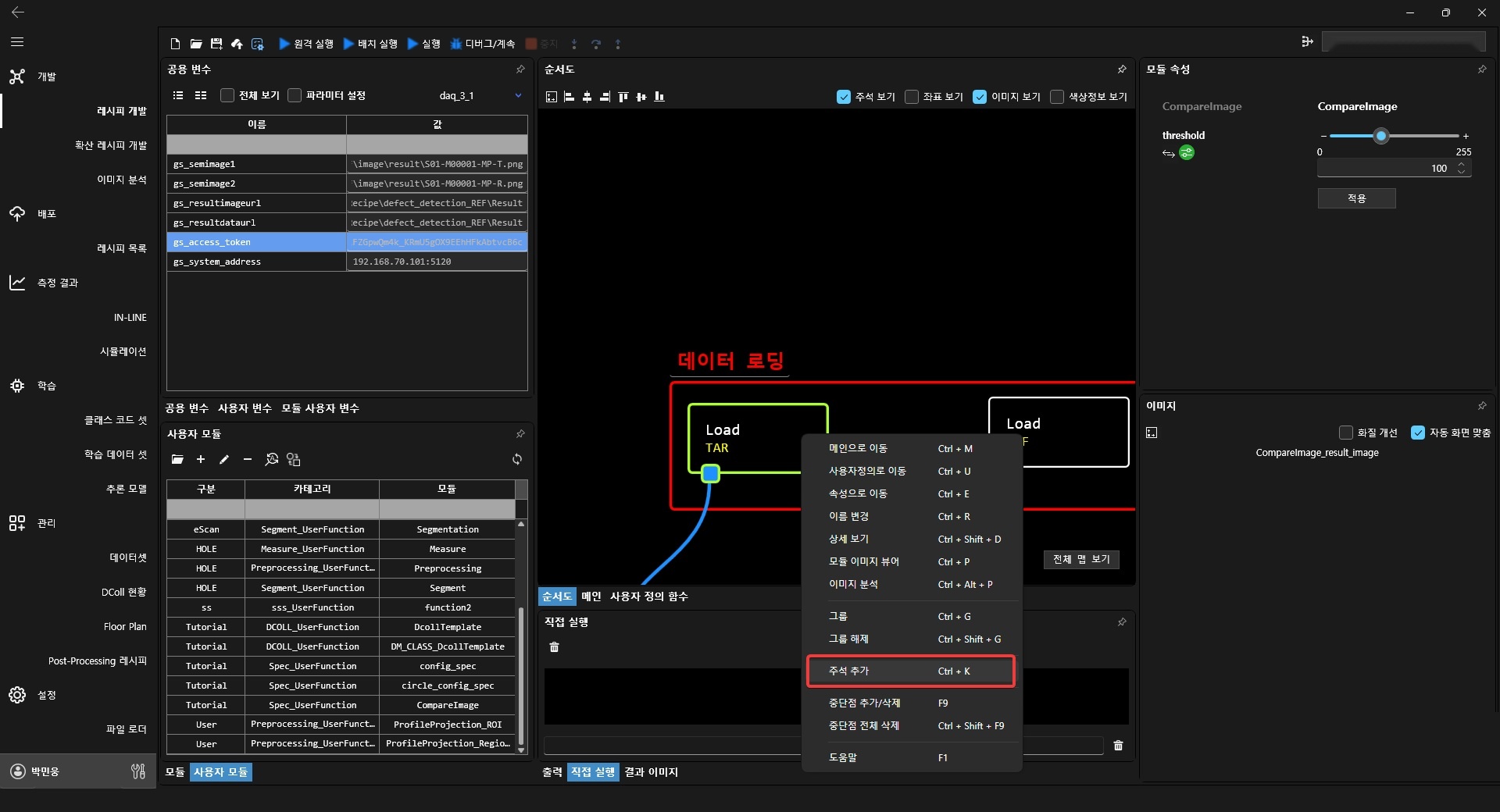
- 주석을 설정하여 모듈에 대한 설명을 표기할 수 있습니다
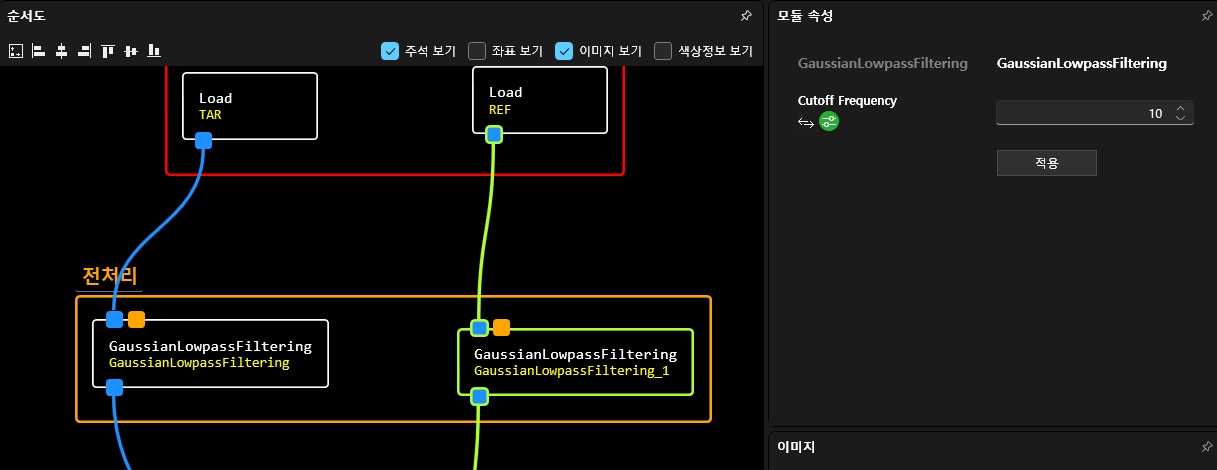
- 이미지를 각각 전처리하기 위한 모듈을 배치합니다
- Alignment은 반복적으로 동일한 구간이 나오는지 확인이 필요합니다
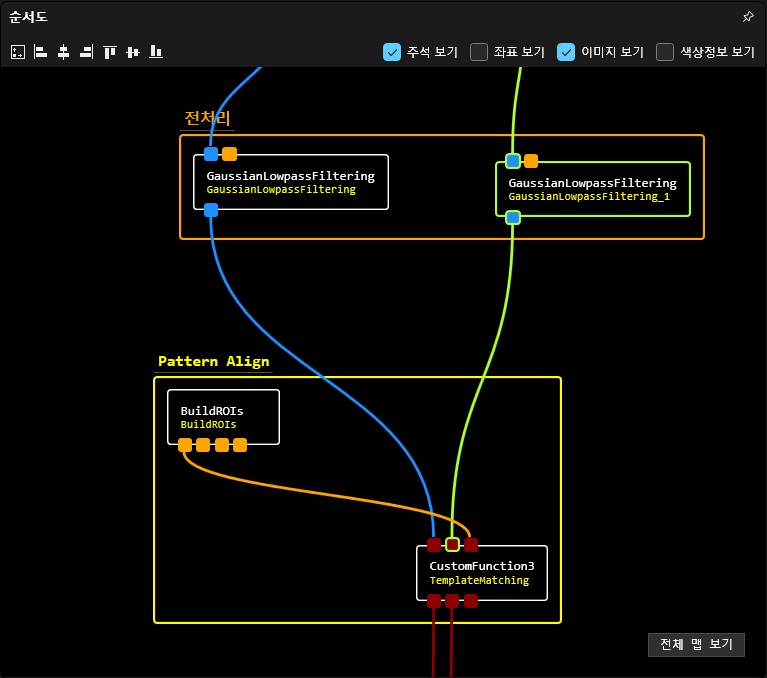
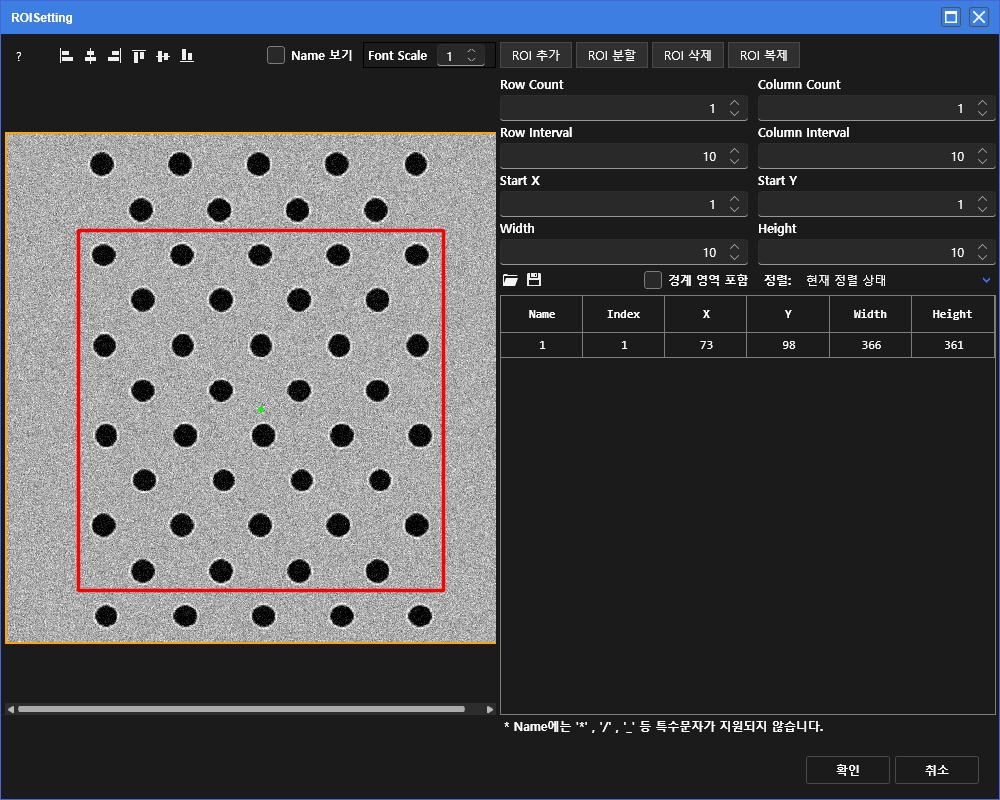
- BuildROIs의 출력은 dictionary 타입으로 포트번호와 'box'라는 키워드로 구성되어 있습니다
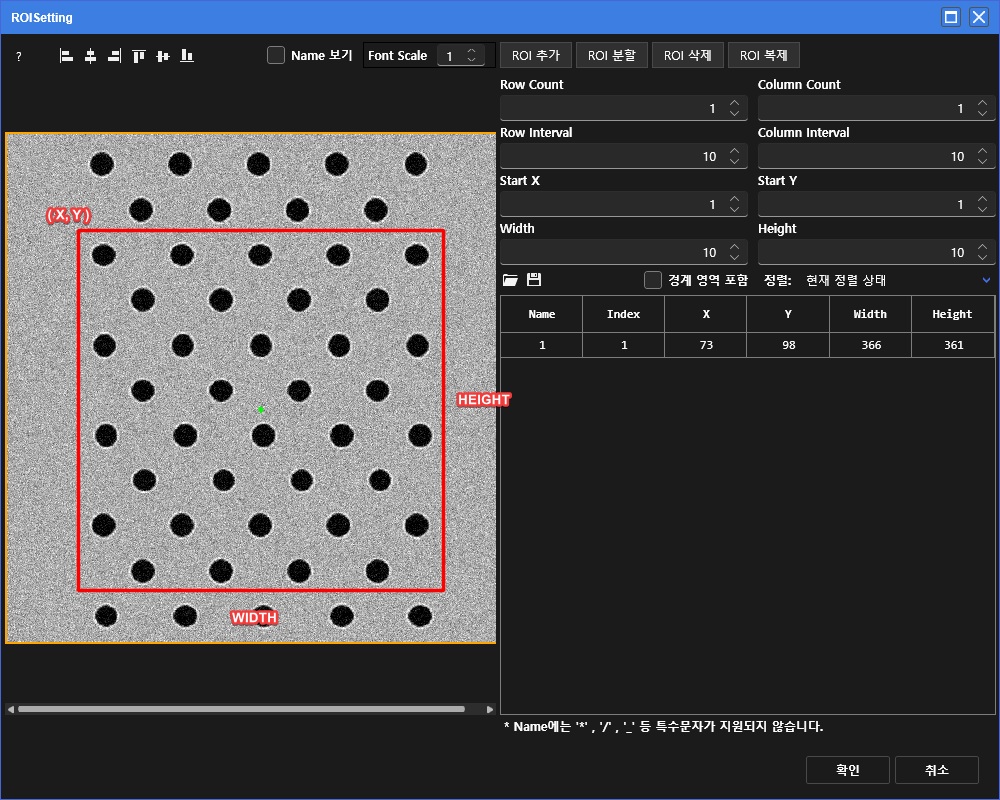
- roi 1개는 좌상단 포인트와 WIDTH, HEIGHT로 구성되어 있습니다
- 코드는 mpp활용해도 되고, opencv 함수를 찾아서 활용해도 됩니다
📜 TemplateMatching 코드
def TemplateMatching(input1, input2, input3):
   imgSrc = input1
   imgRef = input2
   rois = input3


   clip_point_x = rois['1']['box'][0]
   clip_point_y = rois['1']['box'][1]
   clip_width = rois['1']['box'][2]
   clip_height = rois['1']['box'][3]

   clip_ref = mpp.intel64.clip(imgRef, clip_point_x, clip_point_y, clip_width, clip_height)
   res = cv2.matchTemplate(imgSrc, clip_ref, cv2.TM_CCOEFF_NORMED)
   minVal, maxVal, minLoc, maxLoc = cv2.minMaxLoc(res)
   clip_src = mpp.intel64.clip(imgSrc, maxLoc[0], maxLoc[1], clip_width, clip_height)

   return clip_src, clip_ref, None
- "CompareImage"는 사용자모듈로 단순히 이미지를 빼서 값을 비교하는 모듈입니다
- 차이 값에 대한 threshold값을 작게 할 수록 불량에 민감하게 작용합니다
📜 CompareImage 코드
def CompareImage(clip_src, clip_ref, threshold):

   img_subtract = mpp.intel64.subtraction(clip_src, clip_ref, "abs", 0, 1)

   result = mpp.intel64.intensity_thresholding(img_subtract, threshold, "greater")

   resultData = "False"

   regions = mpp.intel64.regions_extraction(result, 8)

   if len(regions) > 0 :
      resultData = "Real"


   result_image = mpp.intel64.gray_to_rgb(clip_src)
   mpp.intel64.paint_regions_boundary_inplace(result_image, regions, 255, 0, 0)


   return result_image, resultData
- DM로 업로드에는 'Temp5' 컬럼에 값을 저장하고 DM에서 ClassNo에 반영하는 설정을 진행합니다
📜 DM_CLASS_DcollTemplate 코드
def DM_CLASS_DcollTemplate(input1, input2, input3, input4, input5):
   import mpp
   import os

   result_image = input1
   resultData = input2
   spec_in_class_name = input3
   spec_out_class_name = input4
   global_items = input5

   if resultData == "False" :
      result_class = spec_in_class_name
   else :
      result_class = spec_out_class_name

   defect_id = global_items['gs_defectid']
   input_image_file_name_without_extension = mpp.daq.utilities.get_image_file_name_without_extension(global_items['gs_semimage1'])

   #### Result Uri
   image_file_name = f'{defect_id}_result.jpg' if input_image_file_name_without_extension is None else f'{input_image_file_name_without_extension}_result.jpg'
   result_image_file_uri = os.path.join(global_items['gs_resultimageurl'].strip(), image_file_name)
   summary_file_uri = os.path.join(global_items['gs_resultdataurl'].strip(), f'{defect_id}_Summary.csv')
   defect_file_uri = os.path.join(global_items['gs_resultdataurl'].strip(), f'{defect_id}_Defect.csv')
   dcoll_file_uri = os.path.join(global_items['gs_resultdataurl'].strip(), f'{defect_id}_DColl.csv')

   #### Summary Data
   summary_data = list()
   summary_data.append(['WAFERID','DEFECTID','DIEX','DIEY','XREAL','YREAL','IMAGEWIDTH','IMAGEHEIGHT','ALIGNMENT','MEASUREMENT','DEFECT','EXTENSIONFUNC','RELATIVEPATH','PATH','GDSX','GDSY'])
   summary_data.append([global_items['gs_waferid'],global_items['gs_defectid'],global_items['gs_xindex'],global_items['gs_yindex'],global_items['gs_xreal'],global_items['gs_yreal'],'0','0','OK','OK','OK','OK',image_file_name,result_image_file_uri,'0','0'])

   #### DCOLL Data
   dcoll_data = list()
   dcoll_data.append(['ID', 'TYPE', 'NAME', 'VALUE', 'DESCRIPTION'])
   dcoll_data.append([defect_id, 'IMG', 'PATH', result_image_file_uri, 'Result Image'])
   dcoll_data.append([defect_id, 'SMF', 'DEFECTID', defect_id, 'DefectID'])

   #### TODO : Change Following Items
   #### MEASURE -> MESURE : Due to Typo in the SMF File.
   dcoll_data.append([defect_id, 'SMF', 'TEMP5', float(result_class), 'CLASS'])


   #### Save Result
   mpp.intel64.save(result_image, result_image_file_uri)
   mpp.intel64.save_csv(summary_data, summary_file_uri)
   mpp.intel64.save_csv(summary_data, defect_file_uri)
   mpp.intel64.save_csv(dcoll_data, dcoll_file_uri)

   return None